
Lesson 3 — Build an Agent Control Map
Module 5, Unit 1 | Lesson 3 of 3
By the end of this lesson, you will be able to:
- Export a structured execution trace from the controlled agent loop you built in L1.2 (K9, B6)
- Use the trace to prove where the model proposes, where Python controls and where human review happens (K8, K9, S27)
- Build an Agent Control Map that shows the control gate, approved tool, fallback route and review package (K8, S27)
- Run a small control test table using normal, unknown, low-confidence and sensitive examples (K8, K9, S27)
- Upgrade your Commit Log Agent so it can review trace evidence, control tests and GitHub-ready updates (B6, S27)
In L1.2, you built a controlled agent loop in a Jupyter notebook. The model proposed an action. Python checked whether that action was allowed. The system used an approved guidance source only when the rules were satisfied. The draft stopped at human review.
That is already more than a diagram. It is a working trace of a controlled AI system.
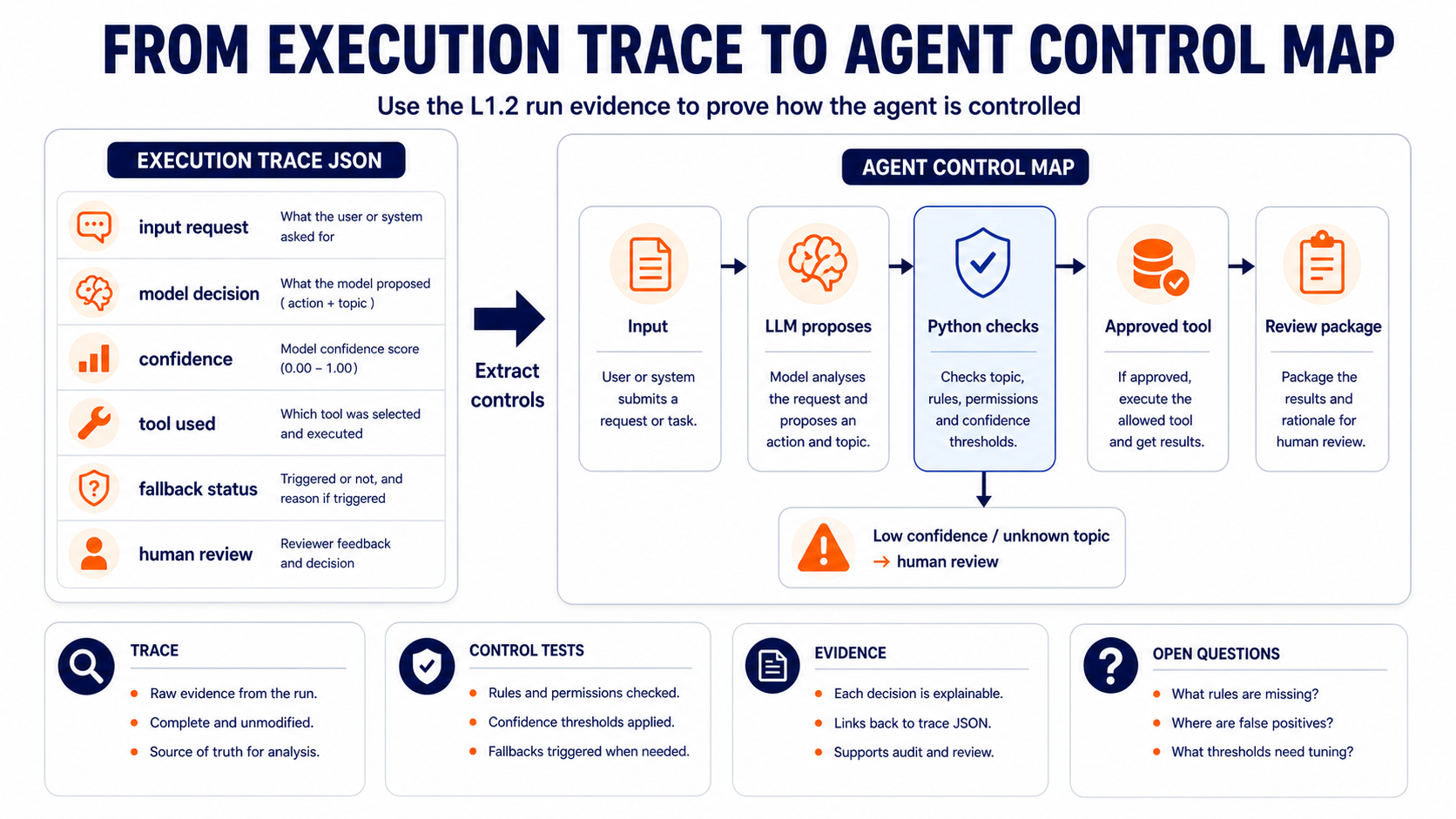
In this lesson, you will turn that run into evidence. You will export a structured execution trace, test a few control cases and build an Agent Control Map from what actually happened in the notebook.
This is not a repeat of the workflow diagrams from Modules 1 and 3. You are not mapping the whole business process again. You are showing the control evidence around the AI component:
- what the model proposed
- what Python allowed or blocked
- which tool or knowledge source was used
- what happened when the case was unclear
- where human review stayed in control
- what evidence the system recorded
By the end of this lesson, you will have:
- Rerun the L1.2 notebook so the latest
stateobject is visible. - Exported the execution trace as JSON.
- Opened the JSON trace and identified the control fields:
model_decision,confidence,tool_used,fallback_triggeredandhuman_review_required. - Run the control test table with normal, unknown, low-confidence and sensitive examples.
- Built the Agent Control Map from the trace, not from memory.
- Written a README note that explains the evidence without exposing private data.
- Used the Commit Log Agent to review the evidence and ask useful questions.
Build Part 1 — Export the Execution Trace
Open your L1.2 Jupyter notebook:
l1_2_controlled_agent_loop.ipynb
Save a copy for this lesson as:
l1_3_agent_control_map.ipynb
In VS Code, use File → Save As... to save the notebook with the new name, or copy the file in your file explorer before reopening it.
Run the L1.2 cells first so your notebook has a populated state object. You should be able to see:
- the original service request
- the model decision
- the tool used, or the fallback reason
- the status
needs_human_review - the draft for human review
Then add this new cell at the end of the notebook.
import json
from datetime import datetime
from pathlib import Path

trace = {
    "lesson": "L1.3",
    "trace_created_at": datetime.now().isoformat(timespec="seconds"),
    "input_request": state["request"],
    "model_decision": state["model_decision"],
    "tool_used": state["tool_used"],
    "tool_result_summary": state["tool_result"][:160],
    "fallback_triggered": state["tool_used"] == "none",
    "human_review_required": state["status"] == "needs_human_review",
    "review_package_created": "draft_for_human_review" in state,
}

Path("module-5/unit-1").mkdir(parents=True, exist_ok=True)
trace_path = Path("module-5/unit-1/l1_3_agent_execution_trace.json")
trace_path.write_text(json.dumps(trace, indent=2), encoding="utf-8")

print(f"Execution trace saved to: {trace_path}")
print(json.dumps(trace, indent=2))
Expected output: the notebook should print the save path and a readable JSON trace. The trace should show whether a fallback was triggered and whether human review is required.
If you see an error such as name 'state' is not defined or name 'json' is not defined, rerun the earlier L1.2 cells in order before running the trace export cell again.
If your notebook cannot run the API today, use the sample output from L1.2 and create a practice trace manually. Make it clear in your Commit Log Agent entry that this was a practice trace, not a live API run.
Build Part 2 — Run Control Tests
A single successful example does not prove control. You need to show what happens when the input changes.
Add this Markdown table to your notebook or README and complete it using your L1.2 code:
| Test case | Input type | Expected control behaviour | What happened | Evidence |
|---|---|---|---|---|
| Normal request | Delivery delay | Approved guidance retrieved |  |  |
| Unknown topic | Sponsorship request | Fallback to human review |  |  |
| Sensitive request | Account access | Human review remains required |  |  |
| Low-confidence case | Ambiguous request | Fallback or manual review |  |  |
To run each test, go back to the service_request cell, replace the text and rerun the decision, control and draft cells. Then update the table.
Use these practice inputs if you do not want to use workplace examples:
service_request = """
A customer says their order has not arrived and wants to know what will happen next.
"""
service_request = """
A customer is asking whether the company can sponsor a local event next summer.
"""
service_request = """
A customer cannot access their account and wants the support team to confirm
which email address is linked to it.
"""
service_request = """
A customer says they have a problem but does not explain what the problem is.
"""
The point is not to make every test pass. The point is to see whether the control gate behaves responsibly when the request is unclear, unsupported or sensitive.
Build Part 3 — Create the Agent Control Map
Now create one visual artefact:
module-5/unit-1/l1_3_agent_control_map.png
You can use draw.io, Excalidraw, Miro, PowerPoint, Google Slides or a clear hand-drawn sketch photographed well. This is not a business workflow diagram. It is a control map built from your execution trace.
Your Agent Control Map must show:
- Input request — what entered the system.
- LLM proposes — the model decision, topic and confidence.
- Python checks — the rules, allowed topics, approved tools and confidence threshold.
- Approved tool or knowledge source — what the system is allowed to retrieve.
- Review package — the output prepared for a human.
- Fallback route — what happens when the topic is unknown, confidence is low or the request is sensitive.
- Trace evidence — where the JSON trace, state record or log proves what happened.
- Human review — who checks or owns the outcome before anything is sent or acted on.
Label arrows with the actual evidence that moves between components:
input_requestmodel_decisionconfidencetool_usedfallback_triggeredreview_packagehuman_review_required
If you are adapting this to your workplace project, use data type labels instead of real data. For example, write customer message or case metadata, not real customer content.
Add It to Your AI Projects Repository
Use your existing AI Projects repository from L1.1. Do not create a new repository for this lesson.
Your folder should contain:
module-5/unit-1/l1_3_agent_control_map.ipynb
module-5/unit-1/l1_3_agent_execution_trace.json
module-5/unit-1/l1_3_agent_control_map.png
If it is safe to share, add the cleaned files to GitHub. Add this README note:
### L1.3 - Agent Control Map

This artefact extends my L1.2 controlled agent loop. I exported a structured execution trace, ran control tests and created an Agent Control Map showing where the model proposes, where Python controls, where fallback happens and where human review remains required.
Use one of these routes:
- GitHub browser route: open your AI Projects repository, choose Add file then Upload files, upload the cleaned files, and use the commit message
add L1.3 agent control map. - Local Git route: save the files inside your local repository, then run:
git add module-5/unit-1/l1_3_agent_control_map.ipynb
git add module-5/unit-1/l1_3_agent_execution_trace.json
git add module-5/unit-1/l1_3_agent_control_map.png
git commit -m "add L1.3 agent control map"
git push
If your notebook or trace contains sensitive workplace information, keep the detailed version private. Publish a cleaned practice version or a summary that your organisation would be comfortable with you sharing.
Upgrade Your Commit Log Agent
Your Commit Log Agent now gets a more technical review role. It should check whether your evidence proves control, not just describe what you made.
Open your commit-log-agent.md file. Add this reusable L1.3 prompt under the existing agent brief:
## L1.3 - Agent Control Map Review

Use the Commit Log Agent rules above. Help me review and document my L1.3 agent control evidence.

Context:
- Notebook filename or link:
- Execution trace filename or link:
- Agent Control Map filename or link:
- Test cases I ran:
- What happened in the normal request test:
- What happened in the unknown topic test:
- What happened in the sensitive request test:
- What happened in the low-confidence test:
- Evidence that the model only proposed:
- Evidence that Python controlled the action:
- Evidence that fallback and human review were preserved:
- Evidence I can safely share:
- Evidence I must keep private:

Please draft:
1. A short evidence review: what proves control, what is missing and what should be improved.
2. A concise Commit Log entry for this lesson.
3. A GitHub-ready README note.
4. A suggested commit message.
5. Two questions I should discuss with my instructor or line manager.

Before drafting, ask me up to three questions if any important detail is missing. Do not invent links, screenshots, repository paths, test results, workplace systems, risks or confidential details.
Use the prompt after you have created the trace, completed the control test table and exported the Agent Control Map. Review the agent's output before it becomes evidence.
Review Before You Keep or Publish It
Before you add anything to GitHub, your portfolio or apprenticeship evidence, check:
- The trace does not include API keys, personal data, customer data or confidential employer information.
- The control test table shows more than one input type.
- The Agent Control Map is based on the execution trace, not a generic business workflow.
- The map shows the model proposal, Python control gate, approved tool, fallback route and human review point.
- The evidence makes it clear that the model does not act alone.
- The Commit Log Agent entry is accurate and reviewed by you.
- If workplace details are sensitive, the public version is cleaned or replaced with a safe practice example.
Checklist
- I copied or extended my L1.2 notebook into
l1_3_agent_control_map.ipynb - I exported
l1_3_agent_execution_trace.json - I completed a control test table with normal, unknown, sensitive and low-confidence cases
- I created
l1_3_agent_control_map.png - My map shows model proposal, Python control, approved tool, fallback and human review
- I added cleaned evidence to my AI Projects repository, or recorded why it cannot be shared publicly yet
- I upgraded my Commit Log Agent with the L1.3 Agent Control Map Review prompt
- I used the Commit Log Agent to review the evidence, then checked the output myself

KSB evidence focus
-
K8 — The capabilities, risks and implications of on-premise, cloud-based and third-party solutions. Your trace and control map show what the AI component can access, what it cannot access, where data moves and what controls prevent unsafe progression.
-
K9 — AI and automation concepts, models and limitations. The execution trace shows the agent loop in evidence form: model decision, confidence, tool use, fallback and human review. This demonstrates that you understand both the model's capability and its limits.
-
S27 — Apply technical understanding to help align business needs with technical capabilities, supporting the development of solutions that are scalable, efficient and aligned with the organisation's strategic objectives. Control tests and an Agent Control Map turn technical behaviour into a reviewable artefact that stakeholders can question and improve.
-
B6 — Shows curiosity and initiative, experimenting with AI and automation, while ensuring such exploration is conducted safely, ethically and with regard for potential impacts. You are experimenting with agent behaviour, testing edge cases, cleaning evidence for safe sharing and using your Commit Log Agent to improve the quality of your portfolio evidence.
Up next: Unit 2 moves from controlled agent behaviour to model choice. You will start by building a Multimodal Decision Gate, then use that evidence to compare platform options and justify a route for your project.