
Lesson 2 — From a Model Call to an Agent System
Module 5, Unit 1 | Lesson 2 of 3
By the end of this lesson, you will be able to:
- Build a small controlled agent loop in a Jupyter notebook (K9, B6)
- Describe the main components of an AI agent system and explain the job each one performs (K8, K9)
- Trace how the model, tools, state and human review point work together in your notebook (K9, S27)
- Compare single-agent, pipeline-agent hybrid and multi-agent patterns for a realistic workplace use case (K8, S27)
- Improve your Commit Log Agent so it can record build evidence, design decisions and safe GitHub updates (B6, S27)
In Lesson 1, you made a model call and inspected what came back: the response, the token counts and the latency. That was the smallest useful unit of AI development.
In this lesson, you build the next layer around it.
A workplace AI system is rarely just one prompt sent to one model. It usually needs instructions, data, tools, memory, validation, logging and a clear place where a human can review or intervene. That is what turns a model call into an agent system.
The important idea is simple: the model can propose, but the system controls.
The model may decide that a tool would help. Your code decides whether that tool is allowed, what input it receives, what happens if the tool fails and whether a human must review the result.
The Five Components
Think about a simple service-request assistant. A staff member receives a request. The system needs to understand the request, retrieve approved guidance, draft a recommendation and pass that draft to a person before anything is sent.
That system has five main components.
1. The LLM core
The LLM core is the model call at the centre of the system. It receives context and produces text, structured output or a tool request. It does not take action by itself. If an email is sent, a record is updated or a file is searched, that action happens because your code allowed it.
In design notes, describe the LLM core by naming the task it performs. For example: "classify a service request", "draft a first-pass recommendation" or "summarise an incoming message for review".
2. Instructions and context
The model needs to know what role it is playing, what rules it must follow and what information it has available. This includes the system prompt, the user request, conversation history, retrieved documents and any structured data you include in the call.
Lesson 1 matters here. The more context you add, the more tokens you use. A long prompt can improve quality, but it can also increase cost, latency and the risk of exceeding the context window.
3. Tools and actions
Tools are functions the model can ask your code to run. A tool might search approved guidance, check a status, calculate a value or prepare a ticket.
The model should not have unlimited freedom. Each tool needs a clear name, a defined input format and a decision about whether the result requires human review.
4. Memory and knowledge
Memory is how the system uses information beyond the current prompt. Sometimes memory is the conversation history. Sometimes it is a document store, a vector database, a CRM record, a SharePoint folder or a set of previous decisions.
Be precise. "The agent has memory" is not enough. Say what it can retrieve, where that information comes from and whether the information is safe, current and permitted for this use.
5. Orchestration and state
Orchestration is the code that manages the sequence: receive the task, call the model, run a tool if requested, pass the result back to the model, validate the output and decide what happens next.
State is the system's record of what has already happened. Without state, the system cannot reliably know which step it is on, what has been approved, what has failed or what still needs a human decision.
Key term — Agent loop: The repeating cycle where a system receives a task, asks the model what to do, runs any approved tool calls, gives the results back to the model, checks the output and either continues or stops. Production systems should also include logging, validation and clear stopping conditions.
The API does not remember anything between calls. Each request you send is independent — the model has no memory of previous turns unless you include them. For multi-turn conversations, your code must append each message to the messages list and send the full history with every request. This is a fundamental architectural constraint: state lives in your application, not in the API.
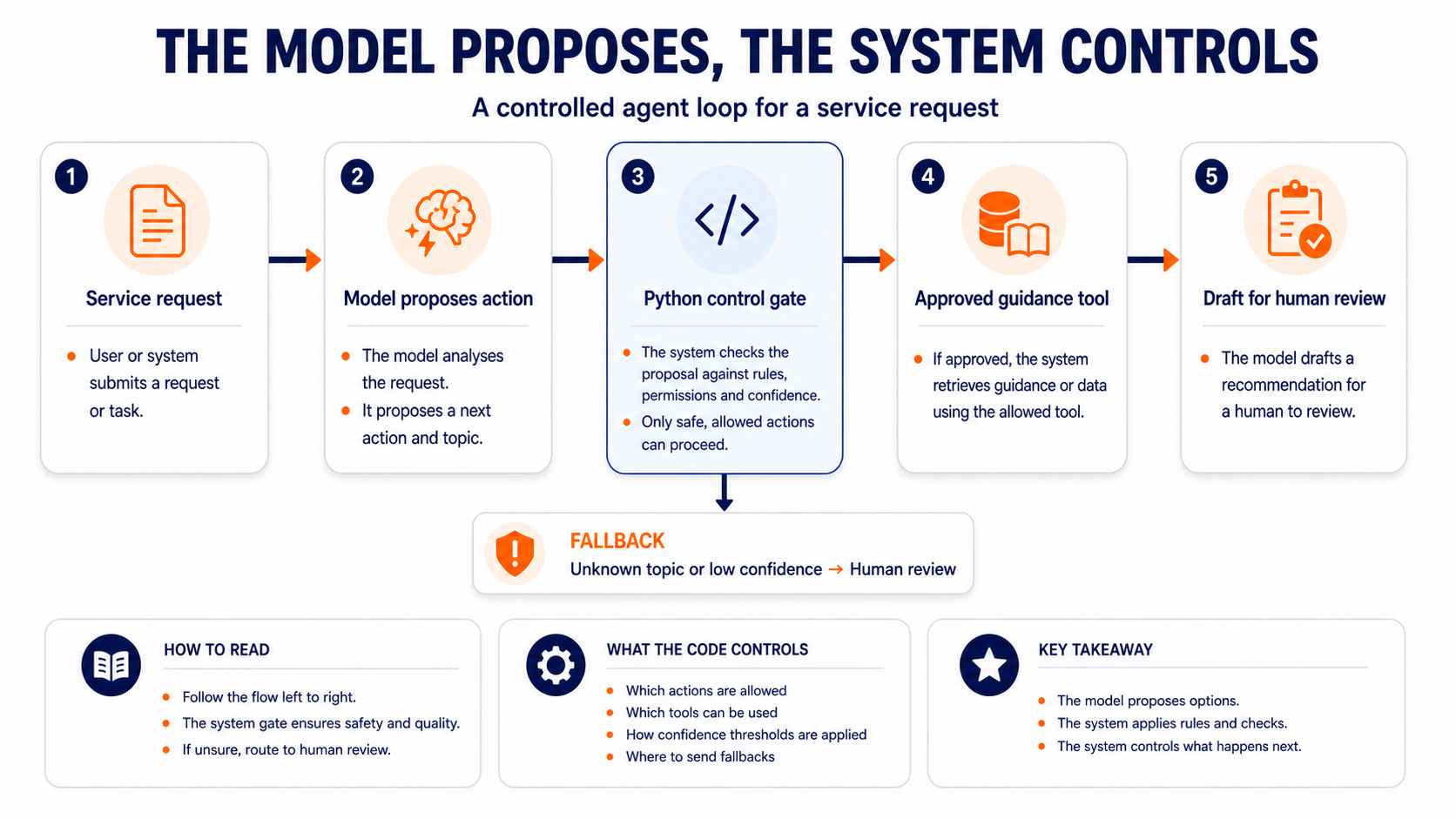
Build — A Controlled Agent Loop in a Jupyter Notebook
You are going to build a small agent loop using a safe practice example. This is not a full production agent. It is a transparent build that shows the architecture clearly: model call, proposed action, approved tool, state record and human review.
By the end of the build, you should have three useful pieces of evidence:
- A Jupyter notebook called
l1_2_controlled_agent_loop.ipynb. - A visible review package showing the model decision, tool result, fallback status and draft for human review.
- A Commit Log Agent entry that explains what you built, what you tested and how the design could apply to your workplace.
For this build, you will need:
- VS Code with the Python and Jupyter extensions installed, or Google Colab in your browser.
- Python and the same
google-genaipackage you used in Lesson 1. - A Gemini API key or organisation-approved API route from Lesson 1.
- Your Commit Log Agent file open nearby, because you will improve it after the notebook runs.
Use a Jupyter notebook inside VS Code. Create a new file called l1_2_controlled_agent_loop.ipynb. If you are using Google Colab, create a new Colab notebook with the same name.
Run the cells in order. Do not skip ahead: each cell creates something the next cell needs.
If this is a fresh notebook environment, run this in the first Jupyter notebook cell:
%pip install -q google-genai
Cell 1 — Connect to the model
Run this in the next Jupyter notebook cell. It uses the same hidden API-key approach as Lesson 1.
import getpass
import json
import os
import re
import textwrap

from google import genai

if not os.environ.get("GEMINI_API_KEY"):
    os.environ["GEMINI_API_KEY"] = getpass.getpass(
        "Paste your Gemini API key. It will not be shown: "
    )

client = genai.Client()

MODEL_NAME = "gemini-2.0-flash"

print("Model client ready")
Do not paste your API key into GitHub, your Commit Log Agent, screenshots, Teams messages or shared documents.
Expected output: the notebook should print Model client ready. If it asks for your API key, paste it into the hidden prompt and press Enter.
Cell 2 — Create a tiny approved knowledge source
This is the knowledge source your agent is allowed to use. In a real workplace system, this might be an approved policy page, ticketing system, CRM record or internal knowledge base. For this build, keep it small and safe.
approved_guidance = {
    "refund_policy": "Refund requests must be checked against the purchase date and product condition. A staff member must approve the final response.",
    "delivery_delay": "Delivery delay cases should include the order reference, expected delivery date and any courier update before a staff member contacts the customer.",
    "account_access": "Account access issues require identity checks before any account information is discussed or changed.",
}

service_request = """
A customer says their order has not arrived. They are frustrated because the delivery
date has passed, and they want someone to tell them what will happen next.
"""

print("Approved guidance topics:", ", ".join(approved_guidance.keys()))
Expected output: the notebook should print the three approved guidance topics. This confirms that your small knowledge source is ready.
Cell 3 — Ask the model to choose the next step
The model is not allowed to run a tool directly. It can only return a proposed action. Your Python code will decide whether that action is allowed.
def extract_json(text):
    match = re.search(r"\{.*\}", text, flags=re.DOTALL)
    if not match:
        print("The model did not return valid JSON. Check the raw response below, then rerun the cell.")
        print(text)
        return {}
    try:
        return json.loads(match.group(0))
    except json.JSONDecodeError as e:
        print(f"Could not parse JSON: {e}\nRaw response: {text}")
        return {}


decision_prompt = f"""
You are helping route a service request inside a controlled AI system.

Allowed actions:
- retrieve_guidance
- human_review

Allowed guidance topics:
- refund_policy
- delivery_delay
- account_access
- unknown

Return only JSON using this exact structure:
{{
  "action": "retrieve_guidance or human_review",
  "topic": "refund_policy, delivery_delay, account_access or unknown",
  "confidence": 0.0,
  "reason": "short reason"
}}

Service request:
{service_request}
"""

decision_response = client.models.generate_content(
    model=MODEL_NAME,
    contents=decision_prompt,
)

decision = extract_json(decision_response.text)
print(json.dumps(decision, indent=2))
Pause after this cell. Read the model's proposed action before you run anything else. This is the first important agent-design habit: inspect before action.
Expected output: a JSON object with an action, topic, confidence and reason. If the topic is delivery_delay, the model has understood the practice request correctly.
Cell 4 — Let Python control the tool
Now add the tool and the control rules. The model has suggested a next step, but Python decides what actually happens.
def retrieve_guidance(topic):
    return approved_guidance.get(
        topic,
        "No approved guidance found. Route this request to a human reviewer.",
    )


state = {
    "request": service_request.strip(),
    "model_decision": decision,
    "tool_used": None,
    "tool_result": None,
    "status": "needs_human_review",
}

action = decision.get("action", "human_review")
topic = decision.get("topic", "unknown")

try:
    confidence = float(decision.get("confidence", 0))
except (TypeError, ValueError):
    confidence = 0

if (
    action == "retrieve_guidance"
    and topic in approved_guidance
    and confidence >= 0.65
):
    state["tool_used"] = "retrieve_guidance"
    state["tool_result"] = retrieve_guidance(topic)
else:
    state["tool_used"] = "none"
    state["tool_result"] = "Fallback: send to human review because the request was unclear or confidence was too low."

print(json.dumps(state, indent=2))
Notice what you have just built. The model did not search everything. It did not send an answer. It did not update a customer record. It proposed an action, and your system checked that action against rules.
Expected output: a state record showing whether the approved retrieve_guidance tool was used. The status should still be needs_human_review.
Cell 5 — Draft for human review
The final model call uses the approved guidance and asks for a draft that a staff member can review. It still does not send anything automatically.
draft_prompt = f"""
You are drafting an internal recommendation for a staff member.
Do not write directly to the customer.
Do not claim that any action has already been taken.

Original service request:
{state["request"]}

Approved guidance available:
{state["tool_result"]}

Write:
1. A two-sentence internal summary.
2. A suggested next step for the staff member.
3. One risk or uncertainty the staff member should check.
"""

draft_response = client.models.generate_content(
    model=MODEL_NAME,
    contents=draft_prompt,
)

state["draft_for_human_review"] = draft_response.text

print("=== REVIEW PACKAGE ===")
print(json.dumps({k: v for k, v in state.items() if k != "draft_for_human_review"}, indent=2))
print("\n=== DRAFT FOR HUMAN REVIEW ===")
print(textwrap.fill(state["draft_for_human_review"], width=100))
Expected output: a review package plus an internal draft for a staff member. The draft should not speak directly to the customer or claim that any action has already happened.
If you cannot use the API today, do not stop. Read the code and use this sample outcome so you can continue the lesson:
Model decision:
{
  "action": "retrieve_guidance",
  "topic": "delivery_delay",
  "confidence": 0.82,
  "reason": "The request is about a delayed order delivery."
}

Tool used:
retrieve_guidance

Draft status:
needs_human_review
What You Built
You have built a small version of an agent loop:
- The service request entered the system.
- The model proposed a structured next step.
- Python checked whether that step was allowed.
- Python retrieved only approved guidance.
- The model drafted an internal recommendation.
- The system kept the output in human review rather than sending it automatically.
This is not just a coding exercise. It is the architecture principle of this lesson in working form: AI judgement inside controlled system boundaries.
Now test the loop by changing the input. Go back to Cell 2, replace the service_request text with one of the examples below, then rerun Cells 2, 3, 4 and 5.
service_request = """
A customer wants a refund for a product they bought last month. They say the
product was damaged when it arrived.
"""
service_request = """
A customer cannot access their account and wants the support team to confirm
which email address is linked to it.
"""
service_request = """
A customer is asking whether the company can sponsor a local event next summer.
"""
Watch how the state changes. The fallback route matters as much as the successful route.
Three Architecture Patterns
Now that you have built a small loop, the architecture patterns should feel less abstract.
Single-agent architecture
A single-agent system uses one model loop, one defined purpose and one controlled tool set. This is usually the best starting point for a narrow task, such as drafting a response, classifying a request or extracting fields from a document.
The common failure mode is overreach. The agent is given too broad a task, too many tools or too much ambiguous context. Design against this with a narrow purpose, clear stopping conditions, output validation and a human review point where the stakes are high.
Pipeline-agent hybrid
A pipeline-agent hybrid places AI steps inside a more predictable workflow. The workflow has fixed stages, and the model handles the parts that need judgement. Your notebook is a small pipeline-agent hybrid: request received, topic selected, approved guidance retrieved, draft produced, human review required.
This is often the strongest workplace pattern because it respects existing processes. It can sit alongside tools, teams and legacy systems without pretending that the model should run the whole operation.
The common failure mode is brittleness. A new case appears that does not fit the fixed stages. Design against this with fallback routes, confidence thresholds, exception handling and human-in-the-loop checkpoints.
Multi-agent architecture
A multi-agent system uses more than one specialised agent, usually coordinated by a router or orchestrator. One agent might retrieve information, another might critique an answer and another might prepare a final recommendation.
This pattern is useful only when the work genuinely needs separate roles. It adds coordination cost, makes testing harder and creates more places where handoffs can fail. Do not choose it because it sounds sophisticated. Choose it only when a simpler design cannot meet the requirement.
The common failure mode is disagreement or drift. Agents may produce conflicting outputs, repeat work or pass unclear tasks to each other. Design against this with defined roles, structured handoff formats, logging and a final decision owner.
Coach Cora
The best architecture is not the one with the most agents. It is the one you can explain, test and improve. If a pipeline with one model call, one approved tool and one human approval point solves the problem, that is a disciplined design.

Improve Your Commit Log Agent
Your Commit Log Agent should now help you record build evidence, not just reflection. Open your commit-log-agent.md file, or wherever you created your Commit Log Agent brief. Add this reusable L1.2 prompt under the existing agent brief:
## L1.2 - Controlled Agent Loop Build

Use the Commit Log Agent rules above. Help me document the controlled agent loop I built in L1.2.

Context:
- Notebook name:
- What my agent loop does:
- The approved tool or knowledge source:
- The fallback route:
- The human review point:
- One change I tested:
- What happened when I tested it:
- Evidence I can safely link or screenshot:
- Anything I must keep private:

Please draft:
1. A concise Commit Log entry for this build.
2. A short Agent Component Map with these headings:
   - LLM core
   - Instructions and context
   - Tools and actions
   - Memory and knowledge
   - Orchestration and state
3. A suggested GitHub commit message or README note.
4. One likely failure mode and one practical control.
5. Two questions I should discuss with my instructor or line manager.

Before drafting, ask me up to three questions if any important detail is missing. Do not invent outputs, screenshots, links, test results, workplace systems or confidential details.
Use the prompt after your notebook runs and after you have tested at least one changed service request. The agent can help you draft the evidence, but you must check it before keeping or publishing it.
Review before you keep or publish it
Before you add anything to GitHub, your portfolio or apprenticeship evidence, check:
- The notebook uses a safe practice example or cleaned workplace example.
- The output does not contain API keys, personal data, customer data or confidential employer information.
- The evidence shows what you built, not just what you read.
- Any screenshot shows the safe practice request, the state record or the review package, not secrets or real customer information.
- The Commit Log Agent entry names the fallback route and human review point.
- The Agent Component Map is specific to the notebook you ran.
- Any GitHub update is a cleaned version that your organisation would be comfortable with you sharing.
If it is safe to share, commit the notebook or a cleaned summary to your AI Projects repository. If it is not safe to share, keep the detailed version private and record a cleaned summary in your Commit Log Agent entry.
Checklist
- I built or carefully traced the controlled agent loop in a Jupyter notebook
- I can explain where the model proposes and where Python controls the action
- I tested at least one change to the service request and observed the result
- I can tell the difference between a single-agent system, a pipeline-agent hybrid and a multi-agent system
- I improved my Commit Log Agent with the L1.2 build-evidence prompt
- I used the Commit Log Agent to draft a build entry and Agent Component Map
- I reviewed the evidence for accuracy, safety and workplace relevance before keeping or publishing it

KSB evidence focus
-
K8 — The capabilities, risks and implications of on-premise, cloud-based and third-party solutions. Your notebook makes those implications visible: what the AI component can access, what it is not allowed to access, where a tool is used and what control prevents unsafe progression.
-
K9 — AI and automation concepts, models and limitations. The agent loop, context, tool request, state record and fallback route are core AI automation concepts. Your evidence is that you built or traced them and can explain where the model's limits require system controls.
-
S27 — Apply technical understanding to help align business needs with technical capabilities, supporting the development of solutions that are scalable, efficient and aligned with the organisation's strategic objectives. Choosing a controlled pipeline-agent hybrid for a service workflow is an S27 decision: it connects technical design to reliability, review and workplace adoption.
-
B6 — Shows curiosity and initiative, experimenting with AI and automation, while ensuring such exploration is conducted safely, ethically and with regard for potential impacts. You experimented by changing the request and observing the system behaviour, then used your Commit Log Agent to record evidence honestly and safely.
Up next: Lesson 3 turns this working loop into trace evidence and an Agent Control Map, showing where the model proposes, where Python controls and where human review stays visible.