
Lesson 1 — Build a Multimodal Decision Gate
Module 5, Unit 2 | Lesson 1 of 3
By the end of this lesson, you will be able to:
- Explain when a task needs a multimodal model and when a text-only or OCR-first route is better (K8, K9)
- Build a Jupyter notebook that inspects a safe image input before any model is chosen (K9, B6)
- Export a modality decision as JSON so your model choice is evidence-based rather than preference-based (K8, S27)
- Test normal, OCR-first, multimodal and human-review routes using safe practice examples (K8, K9, S27)
- Upgrade your Commit Log Agent so it can review modality decisions and prepare GitHub-ready evidence (B6, S27)
Unit 1 focused on controlled agent behaviour: the model proposes, Python controls, and human review stays visible.
Unit 2 asks a different question: what kind of model should this system use in the first place?
Before you compare providers or score platforms, you need to decide what type of input your AI component actually needs to understand. Many AI projects do not need a multimodal model. Some need text only. Some need OCR first. Some genuinely need a vision-language model because layout, handwriting, image quality or visual context changes the answer.
This lesson gives you a practical way to make that decision.
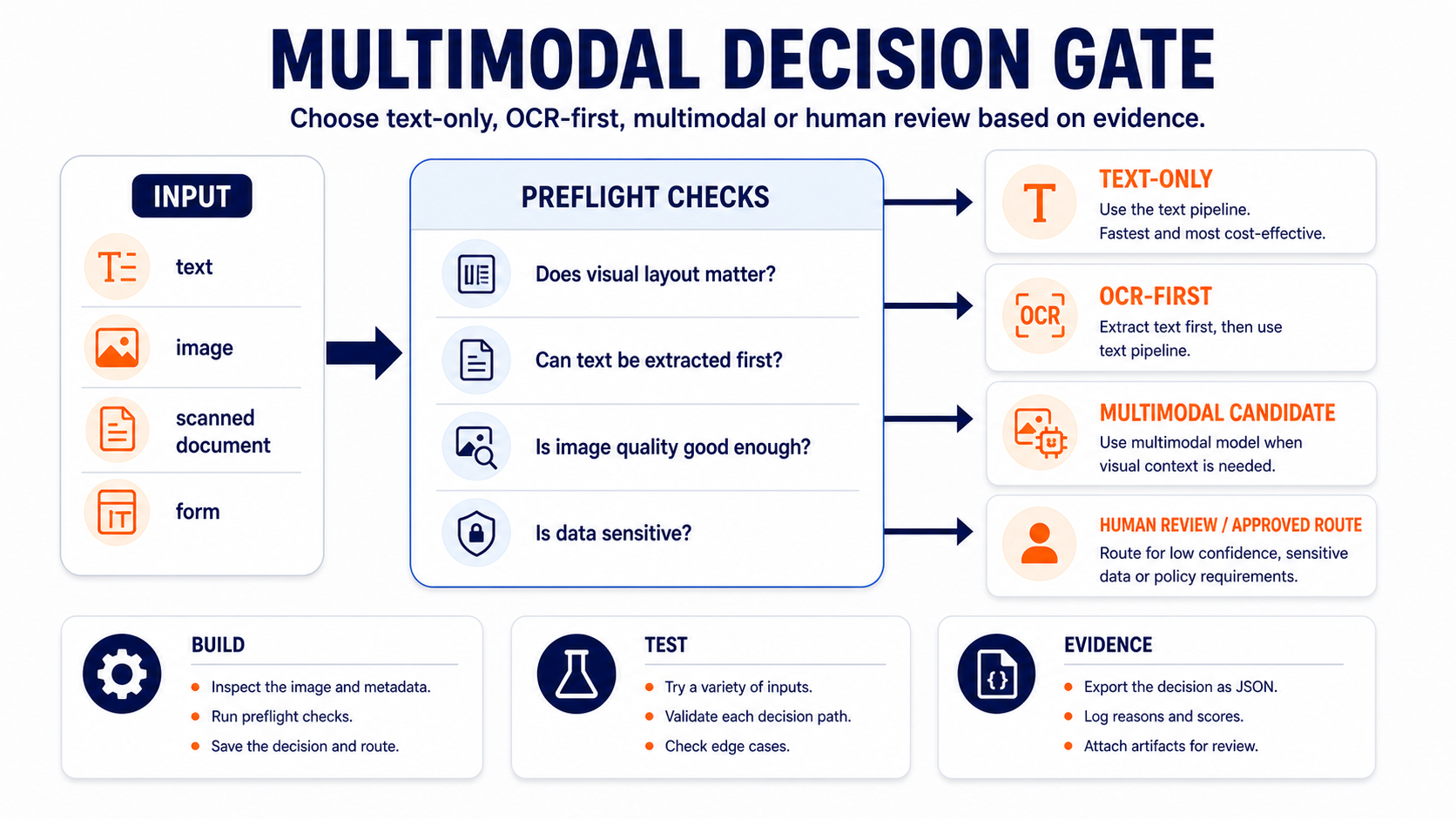
You will build a Multimodal Decision Gate. It will inspect a safe image input, record the preflight checks and recommend one of four routes:
- Text-only — use the normal text pipeline.
- OCR-first — extract text first, then use the text pipeline.
- Multimodal candidate — use a model that can reason over image and text together.
- Human review / approved route — stop and ask for review because quality, sensitivity or policy constraints make automatic processing unsafe.
Multimodal inputs appear more often than you might expect in a typical workplace: a PDF report containing charts and tables, a slide deck sent as an image for summarisation, a scanned form or invoice that needs data extracted, or a product image that needs to be described and categorised. You do not need all four use cases — pick the one closest to your own project.
The diagram below shows how an input is inspected and routed before any model is chosen.
Key Idea — Multimodal Is a Decision, Not an Upgrade
A multimodal model can work with more than one input type, commonly text plus images. That does not make it automatically better for every task.
Use multimodal capability when the visual information changes the answer. For example:
- a scanned form where layout matters
- a handwritten note that cannot be reliably converted to text first
- a product image where the defect is visual
- a dashboard screenshot where position, colour or visual grouping matters
Use text-only or OCR-first when the useful information can be represented as clean text. For example:
- a typed email
- a well-structured text report
- a support ticket with no image evidence
- a scanned document where reliable OCR gives you the fields you need
The professional question is not, "Can a model process this image?" It is:
What is the simplest safe route that preserves the information needed for the task?
Coach Cora
Multimodal is not a reward for having an image. Treat it as an evidence decision. If OCR gives you the information cleanly, use OCR-first. If visual layout, handwriting, damage or image context changes the answer, a multimodal route may be justified. If sensitivity or quality is uncertain, stop and get approval before any model sees the file.

Build Part 1 — Create a Safe Image Input
Create a new Jupyter notebook called:
l2_1_multimodal_decision_gate.ipynb
Use a Jupyter notebook inside VS Code or Google Colab. Do not run this in a plain .py file, PowerShell or Command Prompt.
Create or use this folder in your AI Projects repository:
module-5/unit-2/
Run this in the first notebook cell:
%pip install -q pillow
Then run this cell to create a safe synthetic receipt image. This avoids using real customer, supplier or workplace data.
from pathlib import Path

from PIL import Image, ImageDraw, ImageFont

output_dir = Path("module-5/unit-2")
output_dir.mkdir(parents=True, exist_ok=True)

image_path = output_dir / "l2_1_sample_receipt.png"

image = Image.new("RGB", (900, 620), "white")
draw = ImageDraw.Draw(image)
font = ImageFont.load_default()

lines = [
    "SAMPLE RECEIPT - PRACTICE DATA ONLY",
    "Supplier: Example Office Supplies",
    "Date: 2026-06-25",
    "Item: Notebook Pack      12.99",
    "Item: Printer Paper      8.50",
    "Total:                   21.49",
    "",
    "Handwritten note: urgent reimbursement",
]

y = 60
for line in lines:
    draw.text((70, y), line, fill="black", font=font)
    y += 48

draw.rectangle((55, 45, 845, 540), outline="black", width=3)
draw.text((590, 500), "APPROVED?", fill="black", font=font)

image.save(image_path)

print(f"Sample image saved to: {image_path}")
print(f"Image size: {image.size}")
Expected output: the notebook should print the image path and dimensions. You should also see l2_1_sample_receipt.png inside module-5/unit-2/.
Build Part 2 — Inspect the Image Before Choosing a Model
Before sending an image to any AI service, inspect what you are dealing with. This is the preflight step.
Run this cell:
from pathlib import Path

from PIL import Image

image_path = Path("module-5/unit-2/l2_1_sample_receipt.png")

with Image.open(image_path) as img:
    width, height = img.size
    mode = img.mode
    image_format = img.format

file_size_kb = image_path.stat().st_size / 1024
megapixels = (width * height) / 1_000_000

preflight = {
    "file_name": image_path.name,
    "file_size_kb": round(file_size_kb, 2),
    "width": width,
    "height": height,
    "megapixels": round(megapixels, 2),
    "mode": mode,
    "format": image_format,
    "quality_check": "pass" if width >= 600 and height >= 400 else "review",
}

preflight
Expected output: a dictionary showing the image metadata. The quality_check should say pass for the generated sample image.
This is not yet "using multimodal AI". It is the professional step before that: checking whether the input is usable, safe and worth routing to a model that can process images.
Build Part 3 — Route the Input
Now build the decision gate.
Run this cell:
import json
from pathlib import Path

case = {
    "case_name": "sample_receipt",
    "input_type": "scanned_document",
    "visual_layout_matters": True,
    "text_can_be_extracted_first": False,
    "contains_sensitive_data": False,
    "image_quality": preflight["quality_check"],
    "reason": "The task may depend on receipt layout and handwritten note interpretation.",
}


def recommend_route(case):
    if case["contains_sensitive_data"]:
        return {
            "route": "human_review_or_approved_route",
            "reason": "Sensitive data needs an approved handling route before model processing.",
        }

    if case["image_quality"] != "pass":
        return {
            "route": "human_review_or_rescan",
            "reason": "Image quality is not good enough for reliable automated processing.",
        }

    if not case["visual_layout_matters"]:
        return {
            "route": "text_only",
            "reason": "The task does not require visual information.",
        }

    if case["text_can_be_extracted_first"]:
        return {
            "route": "ocr_first",
            "reason": "Text can be extracted before the LLM is used.",
        }

    return {
        "route": "multimodal_candidate",
        "reason": "Visual layout or image content is needed for the task.",
    }


decision = {
    "lesson": "L2.1",
    "preflight": preflight,
    "case": case,
    "recommendation": recommend_route(case),
}

decision_path = Path("module-5/unit-2/l2_1_modality_decision.json")
decision_path.write_text(json.dumps(decision, indent=2), encoding="utf-8")

print(f"Decision saved to: {decision_path}")
print(json.dumps(decision, indent=2))
Expected output: a JSON decision saved to:
module-5/unit-2/l2_1_modality_decision.json
For the default sample receipt, the route should be multimodal_candidate.
Build Part 4 — Test Other Routes
A decision gate is only useful if you test more than one path.
Run this cell:
test_cases = [
    {
        "case_name": "plain_support_email",
        "input_type": "text",
        "visual_layout_matters": False,
        "text_can_be_extracted_first": True,
        "contains_sensitive_data": False,
        "image_quality": "pass",
        "reason": "A typed support email can be handled as text.",
    },
    {
        "case_name": "clean_scanned_form",
        "input_type": "scanned_document",
        "visual_layout_matters": True,
        "text_can_be_extracted_first": True,
        "contains_sensitive_data": False,
        "image_quality": "pass",
        "reason": "OCR can extract the relevant fields before model use.",
    },
    {
        "case_name": "poor_quality_photo",
        "input_type": "image",
        "visual_layout_matters": True,
        "text_can_be_extracted_first": False,
        "contains_sensitive_data": False,
        "image_quality": "review",
        "reason": "The photo is too low quality for reliable automation.",
    },
    {
        "case_name": "identity_document",
        "input_type": "image",
        "visual_layout_matters": True,
        "text_can_be_extracted_first": False,
        "contains_sensitive_data": True,
        "image_quality": "pass",
        "reason": "The image may contain personal or regulated data.",
    },
]

for test_case in test_cases:
    result = recommend_route(test_case)
    print(f"{test_case['case_name']}: {result['route']} - {result['reason']}")
Expected output: four different routing decisions. At least one should be text-only, one OCR-first, one multimodal candidate or review route, and one sensitive-data route.
Add a short Markdown table underneath the code cell:
| Case | Route | Why this route is appropriate |
|---|---|---|
| plain_support_email |  |  |
| clean_scanned_form |  |  |
| poor_quality_photo |  |  |
| identity_document |  |  |
Complete the table using your notebook output.
What You Built
You built a preflight and routing artefact for multimodal decisions. It produced:
module-5/unit-2/l2_1_sample_receipt.png
module-5/unit-2/l2_1_modality_decision.json
If you are using GitHub, you can also commit:
module-5/unit-2/l2_1_multimodal_decision_gate.ipynb
This gives you evidence that your model route is based on task requirements, input quality and data sensitivity. That evidence will feed into L2.2 and L2.3, where you build a platform shortlist and turn it into a scored recommendation.
Upgrade Your Commit Log Agent
Your Commit Log Agent should now help you review modality decisions before they become platform recommendations.
Open your commit-log-agent.md file. Add this reusable L2.1 prompt:
## L2.1 - Multimodal Decision Gate Review

Use the Commit Log Agent rules above. Help me review and document my L2.1 multimodal decision gate.

Context:
- Notebook filename or link:
- Sample image filename or link:
- Modality decision JSON filename or link:
- Route recommended for the sample case:
- Other routes I tested:
- Evidence that visual layout matters or does not matter:
- Evidence that OCR-first was considered:
- Evidence that sensitive data handling was considered:
- Evidence I can safely share:
- Evidence I must keep private:

Please draft:
1. A short evidence review: does my decision justify text-only, OCR-first, multimodal or human review?
2. A concise Commit Log entry for this lesson.
3. A GitHub-ready README note.
4. A suggested commit message.
5. Two questions I should discuss with my instructor or line manager before choosing a platform.

Before drafting, ask me up to three questions if any important detail is missing. Do not invent links, screenshots, repository paths, test results, workplace systems, risks or confidential details.
Use the prompt after your notebook has produced l2_1_modality_decision.json and after you have completed the test-case table.
Add It to Your AI Projects Repository
If it is safe to share, add these cleaned files to your AI Projects repository:
module-5/unit-2/l2_1_multimodal_decision_gate.ipynb
module-5/unit-2/l2_1_sample_receipt.png
module-5/unit-2/l2_1_modality_decision.json
Add this README note:
### L2.1 - Multimodal Decision Gate

I built a Jupyter notebook that inspects a safe image input and routes the task to text-only, OCR-first, multimodal candidate or human review. The decision is exported as JSON so my model choice is evidence-based and can feed into the platform evaluation in Unit 2.
Use one of these routes:
- GitHub browser route: upload the cleaned files and use the commit message
add L2.1 multimodal decision gate. - Local Git route: save the files inside your local repository, then run:
git add module-5/unit-2/l2_1_multimodal_decision_gate.ipynb
git add module-5/unit-2/l2_1_sample_receipt.png
git add module-5/unit-2/l2_1_modality_decision.json
git commit -m "add L2.1 multimodal decision gate"
git push
If your evidence includes workplace images, customer data or sensitive documents, do not publish them. Keep the detailed version private and publish a cleaned practice example instead.
Review Before You Keep or Publish It
Before you add anything to GitHub, your portfolio or apprenticeship evidence, check:
- The sample image is synthetic or cleaned.
- The decision JSON does not include personal data, customer data, supplier data or confidential workplace details.
- The notebook explains why each route was chosen.
- The test table includes more than one route.
- The decision does not assume multimodal is better by default.
- The Commit Log Agent entry is accurate and reviewed by you.
Checklist
- I created
l2_1_multimodal_decision_gate.ipynb - I generated or used a safe image input
- I inspected the image before choosing a model route
- I exported
l2_1_modality_decision.json - I tested text-only, OCR-first, multimodal and human-review routes
- I upgraded my Commit Log Agent with the L2.1 review prompt
- I added cleaned evidence to my AI Projects repository, or recorded why it cannot be shared publicly yet

KSB evidence focus
-
K9 — AI and automation concepts, models and limitations. Your decision gate shows that you understand what multimodal models can do and where they are unnecessary. You are distinguishing model capability from task need.
-
K8 — The capabilities, risks and implications of on-premise, cloud-based and third-party solutions. Image inputs can change cost, data handling and compliance risk. Your preflight checks make those implications visible before any platform is chosen.
-
S27 — Apply technical understanding to help align business needs with technical capabilities, supporting the development of solutions that are scalable, efficient and aligned with the organisation's strategic objectives. Choosing text-only, OCR-first, multimodal or human review is a technical decision connected to cost, reliability and workplace suitability.
-
B6 — Shows curiosity and initiative, experimenting with AI and automation, while ensuring such exploration is conducted safely, ethically and with regard for potential impacts. You experimented with safe practice inputs, tested different routes and used the Commit Log Agent to document the evidence responsibly.
Up next: Lesson 2 uses your modality decision to build a realistic platform shortlist. The route comes first: text-only, OCR-first, multimodal or human review. Provider choice comes after that evidence.